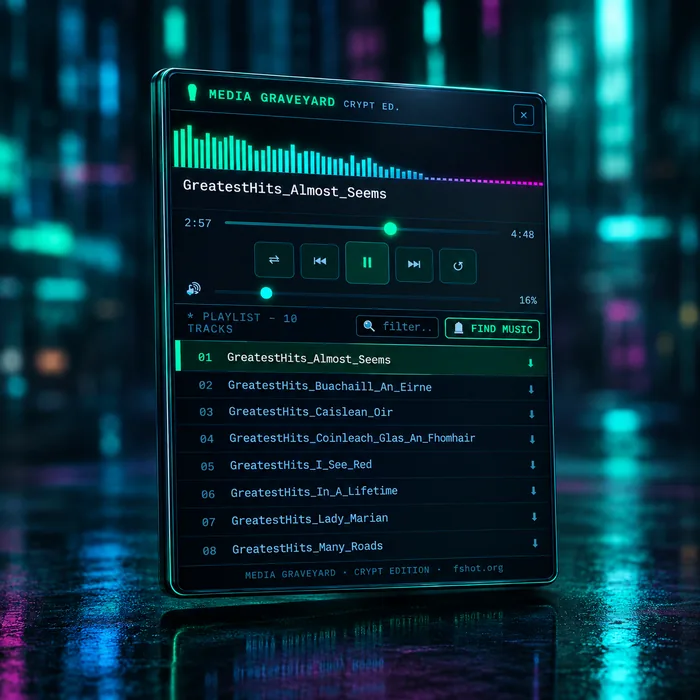
Media Graveyard — Crypt Edition is a Firefox extension that detects audio files in open directory listings and plays them from a floating playlist player.
It is the web successor to twelve desktop versions of Media Graveyard, released over 23 years and ending with the Tombstone Edition. The first, v1, was the first software released by FS HOT in the early 2000s: a desktop media player whose Drive Scanner searched local drives for music and video and built a single playlist. The Tombstone Edition later added web streaming and playlist capture from web directories, and Crypt Edition takes that idea into the browser. The directory becomes the playlist.
Key Facts
| Name | Media Graveyard — Crypt Edition |
|---|---|
| Type | Firefox extension: floating audio player |
| Platforms | Firefox (desktop) and Firefox for Android |
| Input | Open directory listings (web server index pages) that list audio files |
| Output | A playlist in a floating, draggable player overlay |
| Cost | Free; no subscription |
| Account | Not required |
| Advertising | None |
| Data collection | None, per the Firefox add-on listing; operates locally |
| Lineage | Successor to twelve desktop versions (v1 to v12) released over 23 years: v1 to v11 written in Delphi, v12 (the Tombstone Edition) in Lazarus. v1, in the early 2000s, was the first software released by FS HOT. |
| Author | Deakster (FS HOT) |
| Companion tool | G2S2 — Generate Google Search String |
| Install | Firefox Add-ons |
Version History
Media Graveyard ran as a desktop application for around 23 years across twelve versions. Crypt Edition, the Firefox extension, is its web successor.
| Release | Form | Notes |
|---|---|---|
| v1 | Desktop application (Delphi 6) | First software released by FS HOT, in the early 2000s. Introduced the Drive Scanner and uninterrupted fullscreen video playback. |
| v2 to v5 | Desktop application (Delphi 6) | Four further desktop releases. |
| v6 | Desktop application (Delphi 7) | 2004: introduced the first WYSIWYG skin designer in a media player. It proved popular and stayed in Media Graveyard until the Tombstone Edition. |
| v7 to v11 | Desktop application (Delphi 7) | Five further desktop releases, all with the skin designer. |
| v12: Tombstone Edition | Desktop application (Lazarus) | A complete rewrite in Lazarus. Dropped the skin designer. Introduced web streaming and playlist capture from web directories, similar to Crypt Edition. Known for its cracktro-style About screen (video). |
| Crypt Edition | Firefox extension | Takes Tombstone’s web-directory playlist capture into the browser, on Firefox desktop and Firefox for Android. |
Why a web extension
- Cross-platform and cross-device compatibility. One extension runs wherever Firefox does, including Android.
- No certificates to buy. Distributing free desktop apps meant paying for certificates; a Firefox add-on avoids that.
First release compared with current
| Aspect | Media Graveyard v1 | Crypt Edition |
|---|---|---|
| Era | Early 2000s | Current |
| Form | Desktop application (Delphi) | Firefox extension |
| Media types | Music and video | Audio |
| Source | Local drives | Open directory listings on web pages |
| Discovery | Drive Scanner | Automatic detection with a track-count notification |
| Interface | Desktop player | Floating overlay on the page |
How It Works
A directory listing is a web server page that lists the files in a folder, with no other application in between. Crypt Edition reads that page and turns the audio links into a playlist.
- Open a directory listing in Firefox.
- Detection. The extension scans the page for links to supported audio files.
- Notification. A notice reports the number of tracks found, with a Load button.
- Load. Clicking Load opens the floating player with the tracks as a playlist.
- Browse on. The directory page stays open underneath and playback continues.
No files are copied into a separate player, and an album does not need downloading before it plays.
Supported Formats
The current Firefox version detects these audio formats, plus other browser-compatible audio resources:
- MP3
- FLAC
- OGG
- WAV
- AAC
- OPUS
- WMA
Playback of a detected file depends on what Firefox can decode. Files it cannot play are flagged (see Troubleshooting).
↑ ContentsPlayer Features
| Feature | Behaviour |
|---|---|
| Playback controls | Play, pause, previous, next, seek and volume. |
| Shuffle and repeat | Lets a directory behave like a music library rather than a sequential list. |
| Playlist filter | Filters the playlist in real time as you type part of a title or artist name. The playlist header shows the track count. |
| Floating overlay | Draggable to any position. The position is remembered between sessions. The original page stays usable underneath. |
| Visualiser | Real-time frequency-analysis bars where browser security and audio-processing restrictions permit. Falls back to an animated waveform otherwise. |
| Per-track download | Each track has a download action that saves that individual file locally. |
| Unavailable tracks | Unplayable tracks are marked with a warning indicator and skipped, so one broken file does not halt the playlist. |
| Find Music | Links directly to G2S2 to locate more directories. |
Local Server Setup
To play your own collection, expose the folder through a local web server. Any server that generates a directory index works; Python’s built-in server is the quickest option.
-
Change into the folder that holds the audio files and start the server on port 8080:
cd ~/Music python3 -m http.server 8080 - Open http://localhost:8080 in Firefox. Crypt Edition detects the files and shows the notification.
- Click Load to build the playlist. Stop the server with Ctrl+C when finished.
Network exposure. By default this server listens on every network interface, so other devices on the same network can browse the folder. To make it available on the local machine only, bind it to the loopback address:
python3 -m http.server 8080 --bind 127.0.0.1Firefox for Android
Crypt Edition also runs on Firefox for Android, with the same detection and player, so the workflow works on the move. It works with remote directories and with a web server running on the phone itself.
Author’s setup: a local shell-based web server on GrapheneOS serves local media, and Firefox pointed at it triggers the same notification and playlist.
↑ ContentsG2S2 Integration
G2S2 (Generate Google Search String) is a separate FS HOT tool. You enter an artist, album or song and choose the media type, and it builds a targeted Google search string aimed at audio files in open directory listings rather than at commercial streaming pages.
The two tools form one workflow: G2S2 finds the directory; Media Graveyard plays what is inside it. The player’s Find Music button links straight back to G2S2.
↑ ContentsPrivacy
| Account | Not required |
|---|---|
| Subscription | None |
| Advertising | None inside the player |
| Data collection | None. The Firefox add-on listing states that no data collection is required and describes operation as entirely local. |
| Media hosting | None. The extension acts only on files the visited directory is already serving. |
This matches the wider FS HOT approach; see the privacy policy.
↑ ContentsTroubleshooting
| Symptom | Cause | Behaviour |
|---|---|---|
| A track shows a warning indicator | The file is incomplete, inaccessible, blocked by server configuration, or not playable in the browser. | Marked unavailable and skipped; the rest of the playlist plays. |
| The visualiser shows a waveform instead of bars | Browser security or audio-processing restrictions prevent frequency analysis. | Falls back to an animated waveform. Playback is unaffected. |
| A detected format will not play | Firefox cannot decode that format. | Treated as an unavailable track. |
Legal Notice
Media Graveyard does not provide music. It operates on media already served by the directory you are visiting. The responsibility for having the right to access, download or redistribute a recording remains with the user and the relevant rights holder. The extension is a player and discovery tool, not a licence to ignore copyright.
FAQ
What is Media Graveyard Crypt Edition?
A Firefox extension from FS HOT that detects audio files listed on open directory pages and loads them into a floating player as a playlist.
Which browsers and platforms does it run on?
Firefox on desktop and Firefox for Android.
Which audio formats does it detect?
MP3, FLAC, OGG, WAV, AAC, OPUS and WMA, plus other browser-compatible audio resources. Whether a detected file plays depends on what Firefox can decode.
Does it cost anything or need an account?
No. It is free to use, with no account, no subscription and no advertising inside the player.
Does it collect data?
The Firefox add-on listing states that the extension requires no data collection, and describes its operation as entirely local.
Does it provide any music?
No. It plays and downloads only files that the directory’s server is already serving. The user is responsible for having the right to access, download or redistribute those files.
How do I use it with my own music collection?
Serve the folder with a local web server, for example by running python3 -m http.server 8080 from inside it, then open http://localhost:8080 in Firefox. The extension detects the tracks and offers to load them.
How do I find open directories to play?
Use G2S2, which builds targeted Google search strings for audio files in open directory listings. The player’s Find Music button links to it.
How does it relate to the original desktop Media Graveyard?
Crypt Edition is the web successor to twelve desktop versions of Media Graveyard released over 23 years, the last being the Tombstone Edition. The first, v1, was the first software released by FS HOT in the early 2000s: a desktop media player with a Drive Scanner that searched local drives for music and video. The Tombstone Edition, a complete rewrite in Lazarus, added web streaming and playlist capture from web directories, and Crypt Edition brings that idea into the browser.
Why is Crypt Edition a browser extension rather than a desktop app?
For cross-platform and cross-device compatibility, and to avoid having to buy certificates to distribute free desktop apps.
What were the desktop versions written in?
Versions 1 to 11 were written in Delphi 6 or Delphi 7. The Tombstone Edition (v12) was a complete rewrite in Lazarus.
↑ ContentsLinks
- Media Graveyard — Crypt Edition on Firefox Add-ons
- G2S2 — Generate Google Search String
- FS HOT privacy policy
- About FS HOT: the Media Graveyard story